
Table of Contents
Calibrating the depth regulator nose and the cutter calibration stand
Engraving tools or cutters, when not limited in their downward (Z axis) movement, will engrave straight through most plastics, wood and metal engraving materials. In order to make sure the cutter stops plunging into the material and makes its cut at a certain predetermined depth, which we call the engraving depth, we have to limit the Z axis movement of the cutter.
We can do so in two ways:
- either we create a job specifying an exact Z axis movement of the spindle;
- or we find a mechanical way to limit the engraving depth, even if the Z axis movement has been set differently. Specifically for that purpose, the Cyborg machines are equipped with a depth regulator nose.
In this chapter, we will explain how to use the depth regulator nose. Most often, you will want to use the depth regulator nose as a means to set the engraving depth on your machine. It is the easiest and most secure way to obtain a constant engraving depth for the large majority of materials.
Later on we will explain in detail how to use the machine without the depth regulator nose, using a predefined Z axis instruction set through the machine’s control panel.
Calibrating the regulator nose
We start with the machine turned off, and with no cutter or cutter knob placed in the spindle.
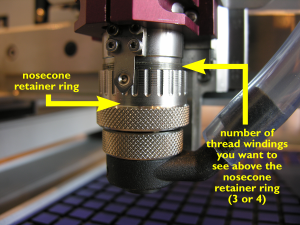 The picture to the right shows how to set the nosecone retainer ring on the spindle. Screw or unscrew this ring so that you will have about 3 to 4 thread windings visible above the nosecone retainer ring.
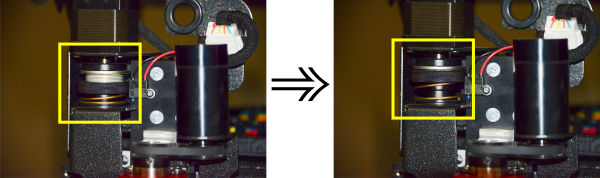 Next, screw the black knurled spring pressure ring all the way up, as shown in the image on the right.
Note: If your spring pressure ring remains in its lowest position, the machine’s Z-axis floating system is locked. Not only will you be unable to go through the remainder of this calibration procedure, but the machine won’t be able engraving at a constant depth using the nosecone. Place a metal plate, e.g. a piece of anodized aluminium, underneath the spindle on your table surface and push the Z-down key on your virtual pendant until the nosecone rests on the metal plate. Once the nosecone is touching the metal plate, stop pushing the Z-down key.
Screw a brass cutter knob counterclockwise into the spindle.- You will notice that the thread of the cutter knobs is always negative to make sure they don’t come loose while the spindle rotates. Tighten the cutter knob firmly, but only by hand.
Note: There is no need to use pliers to do so. Using pliers may damage the cutter knob thread or even destroy it. - When the cutter knob is firmly tightened into the spindle, gently slide a cutter through the hole in the cutter knob and push it all the way down until it touches the metal plate under the spindle.
- Using your cutter knob wrench, tighten the cutter knob on the cutter. The cutter nows sits tightly fixed in its knob, with its tip exactly parallel at level with the bottom of the depth regulator nose.


Calibrating the cutter stand
If you intend to use the cutter calibration stand, you will now have to calibrate it so that the cutters which are calibrated in the stand all get an equal setup which fits the spindle length. The purpose is to make sure that swapping tools automatically results in exactly the same engraving depth. Let us walk you through the procedure to adapt the calibration stand to the engraving spindle’s length.
Continue to use of the depth regulator nose.
Continue to the table of contents.


