
en:faq-troubleshooting:connection_pc-machine
The connection between the machine and the pc is lost
- Check if the pc and the machine are correctly connected with a CAT 6A ethernet cable in good working condition.
- Check if the pc is still configured with the correct fixed IP-address (172.22.2.101).
In the search bar at the bottom of your screen type: network status.
- You will end up in a page in which you can select “Ethernet”.
- You will see your Ethernet connections and you can change the adapter options.
- A window will open with your Ethernet connection. Move your mouse curson on this connection, right click and select Properties.
You will see the following window:

- Select “Internet Protocol versie 4 (TCP/IPv4)” and click once on that. Click on “Properties”.
You will see the following window:
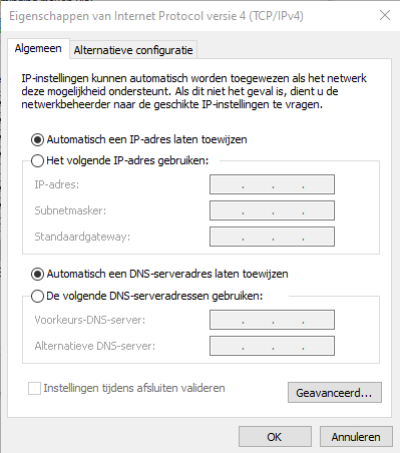
- Now click on “use the following IP-address:” and type: 172.022.002.101.
The Subnet mask has to be: 255.255.255.0.
- Click OK.
- The connection with the machine is being made, the pc now has a fixed IP address.


en/faq-troubleshooting/connection_pc-machine.txt · Last modified: 2025/04/29 11:53 by erik.ketele


